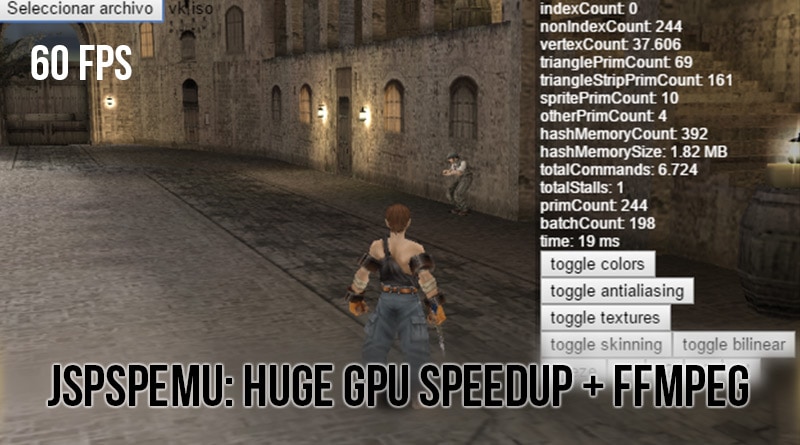
JsPspEmu: Next version: HUGE graphics speedup: Valhalla Knights at 60fps + ffmpeg based media engine
PSPEMU ARTICLE
May 10, 2015
I have been working on some optimizations. Basically I have mostly rewritten the GPU engine and have improved performance a lot. On an i5 @ 2.2GHz with an Intel HD Graphics 5000, Valhalla Knights works most of the time at full speed. I have also been working on an FFmpeg-based media engine for decoding audio and video (WIP).
Huge GPU speedup
In a simplistic way, the GE in PSP works by writing commands into memory and signaling the address of the last command written (updating the stall address). Then the media engine reads the commands and processes them in parallel. While one component is writing commands, the other is reading them. It is therefore parallelizable and could be handled in a multithreaded fashion. But it requires reading and writing the same memory at once, which means that it is not compatible with web workers. You could read commands in one worker and, when stalling, send a copy of the memory to another worker. Since this is not a bottleneck (at least for the moment), I won’t do this.
Each command is a 32-bit word: the upper 8 bits are the command type and the lower 24 bits are data for that command.
Processing the commands should be fast. Before the optimizations I was reading every command and using the 8 upper bits to access a table of functions to execute that command. Most of the commands were updating a state structure.
1st – Simplifying command decoding
The first optimization was to change the table for a switch to enable some optimizations. The switch was huge and the benefits weren’t big. Because most of the commands were just updating the state, I simplified it a lot. I removed most of the cases of the switch, and in the default case I was copying the data of each command to a Uint32Array state table—at least 256 words (one for each command). The switch just contained some flow commands and commands that were writing to matrices. I also changed fields of the state structure to getters that accessed values from Uint32Array. That simplified things a lot and made the code more readable and less prone to errors.
2nd – Uploading vertices as they were defined instead of decoding them
In the previous version I was reading vertices with a reader that converted them into a known structure that worked with floats. That way I was able to generate and modify them easily, but it was slow. I started to read vertices as they are and send them to the host GPU. I had to do several things: sprites, without having geometry shaders, required generating two additional vertices per couple of vertices. I needed to generate dynamic functions that were cloning and modifying those vertices. Colours were in several formats, including 5650, 4444 and 5551. I modified the shader to decode colors on the fly with code grabbed from jpcsp. WebGL 1.0 doesn’t support integer bit operations and won’t support them until WebGL 2.0, so decoding was a bit tricky.
3rd – Degenerate trianglestrip buffering
One of the commands is the PRIM command that draws primitives from vertex/index buffers. It would be similar to the drawElements/drawArrays OpenGL functions. PSP supports optimized drawing of elements without indices. Some games generate several PRIM commands adding several vertices. When drawing triangle strips in several PRIM calls you are generating several strips, but you can combine them by adding a degenerate triangle between strips. That way you can draw all the strips using the same state at once.
4th – WebGL requires drawing all at once + generating batches
In WebGL you can’t decide when to flip the buffers. Instead, you draw all the stuff, and when JavaScript returns to the main loop is when the flip buffer occurs. When stalling several times, the code was executed in several frames and that caused flickering. I needed to be able to render all at once, so I started to prepare a Batch class that includes the state and the vertices/indices to draw. When the emulator runs in a worker it will be able to send those batches to the UI thread, performing the drawing in parallel to running code and improving performance even more.
After the first optimization the state was easy to clone, so I was able to queue Batch objects and draw them when waiting for the GPU to complete drawing.
5th – Upload just one vertex and index buffer once per frame
Instead of uploading several index and vertex buffers per frame, I started to draw all the heterogeneous vertices and indices in the same memory segment and then upload once before drawing batches. Each batch changes the start address of each attribute in the single buffer and draws a segment of indices. There is no buffer changing at all, and that improved performance a lot.
With those optimizations I improved performance in several games. With those plus previous CPU optimizations, Valhalla Knights started to work at full speed.
Future optimizations:
- Run the emulator in a web worker, and send batches to the UI thread. This will reduce the GPU overhead.
- Search for state changes and just call the required GL calls.
- Some games do lots of non-degenerable draws with distinct small textures (Tales of Eternia for example). The idea to improve it is to be able to draw at once. This will be possible by uploading textures into an atlas and then reconstructing texture coords to target that atlas. That will improve performance a lot in those cases.
Media Engine
PSP has a dedicated processor for GPU processing, decoding video and audio, and so on. In previous versions I was decoding ATRAC3+ with MaiAtrac3+ decoding, compiled using Emscripten. I was not decoding MP3 or video.
In the latest versions I have compiled FFmpeg with Emscripten and created a small bridge for decoding audio and, in the future, video. I compiled with the same configuration as PPSSPP, which included just the required formats and codecs.
After compiling with optimizations the JavaScript generated code is 6.7 MB, and I am loading it asynchronously, so the emulator starts before it has finished loading and waits for it when required. The last version of the MediaEngine that just included ATRAC3+ decoding was 1.0 MB.
Comments
Comments are powered by GitHub via utteranc.es.